Run a puzzle challenge for your team.
A custom event is a step challenge for your brain. Do a puzzle, get a point, repeat — a few short puzzles a day, on everyone's own phone, scored between teams. And like a step challenge, nobody cares how fast you were: only that you showed up, and which team you showed up for.
Dayzle is a daily puzzle app — Sudoku, word games and visual logic, across more than 25 games. You run the event yourself and it's private to the people you invite: up to 50 of them, for one, two or four weeks, free to set up. Setting one up is five questions, and Dayzle hands you a poster to put up, with each team's mascot and a QR code to join it. This page is the whole thing — how to run one, what to send the people you invite, and what it asks of them.
That opens the Events tab in your browser. You'll be asked to sign in — an event needs an account, even though playing Dayzle doesn't.
Team building that costs nobody an afternoon.
Step challenges catch on because the thing you're doing is good for you, you're doing it alongside people you know, and everyone ends up pushing everyone else to do a bit more. Those are the same three reasons this works.
A Few Minutes, and No Meeting
Nobody has to be anywhere, book anything, or be in the same country. People play on their own phone whenever suits them — on the bus, over coffee, at 11pm.
Nothing to Buy or Expense
Dayzle is free, an event is free to set up and free to join, and there's no seat count to approve. Nobody has to put anything through the company.
Something to Talk About That Isn't Work
Everyone in the event plays the same boards on the same day, so there's a thing to say to each other in the morning that isn't a status update.
Fun With 2, Great With 20
Two people on two teams is enough to start one, and fifty is the ceiling. Twenty is where it sings — four teams of five, a standings table worth checking each morning, and a close finish. People can join after it has started, too.
One event, a few teams, a few minutes a day.
An event is one time-boxed challenge with one organizer: a start, an end, teams, boards and a winner. This is the whole shape of it.
- 1
Answer Five Questions
Start an Event asks for a name, how many teams (2 to 4, each with a dog or cat mascot in its own jersey), how competitive, who can join, and when it starts. Everything else has a default and sits under Advanced Options.
- 2
Put Up the Poster
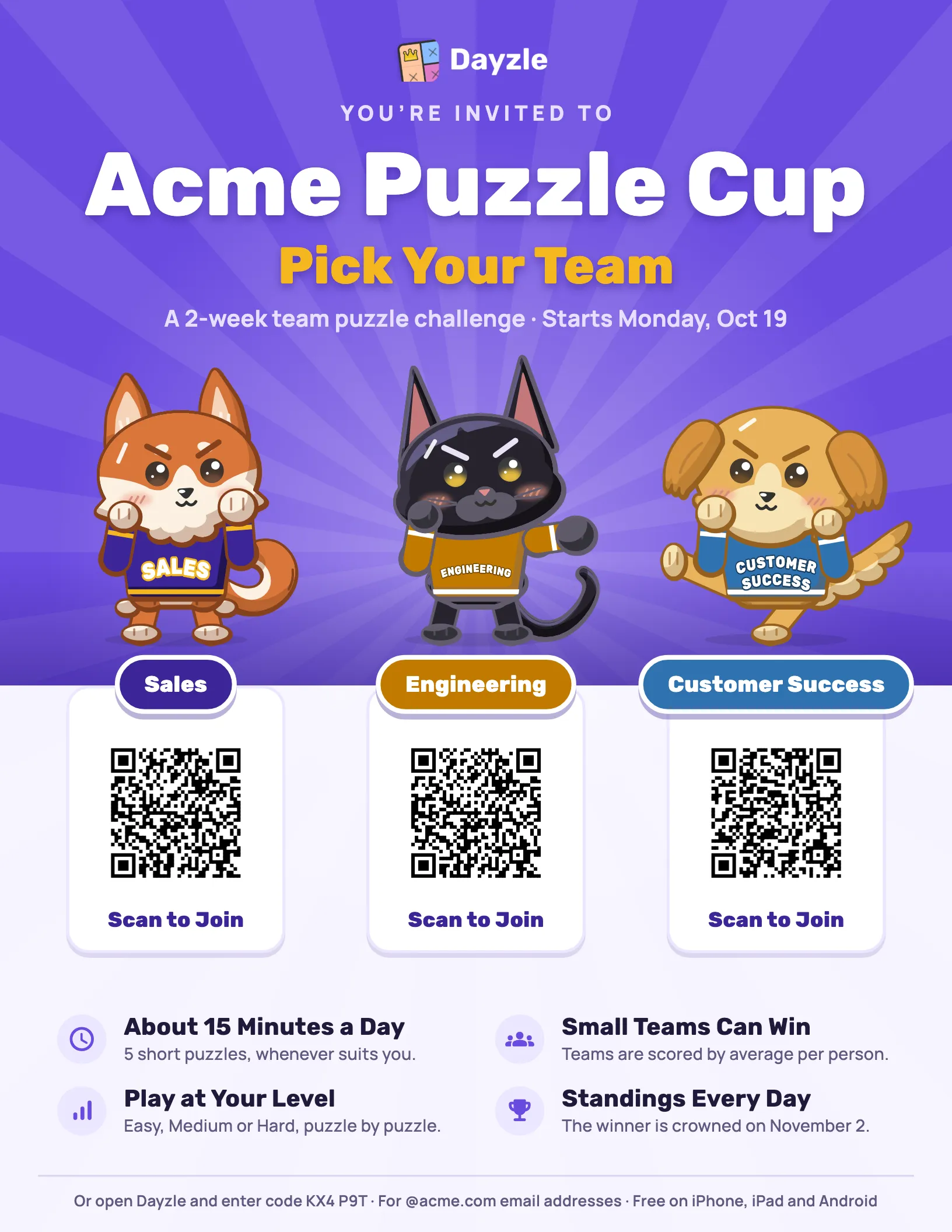
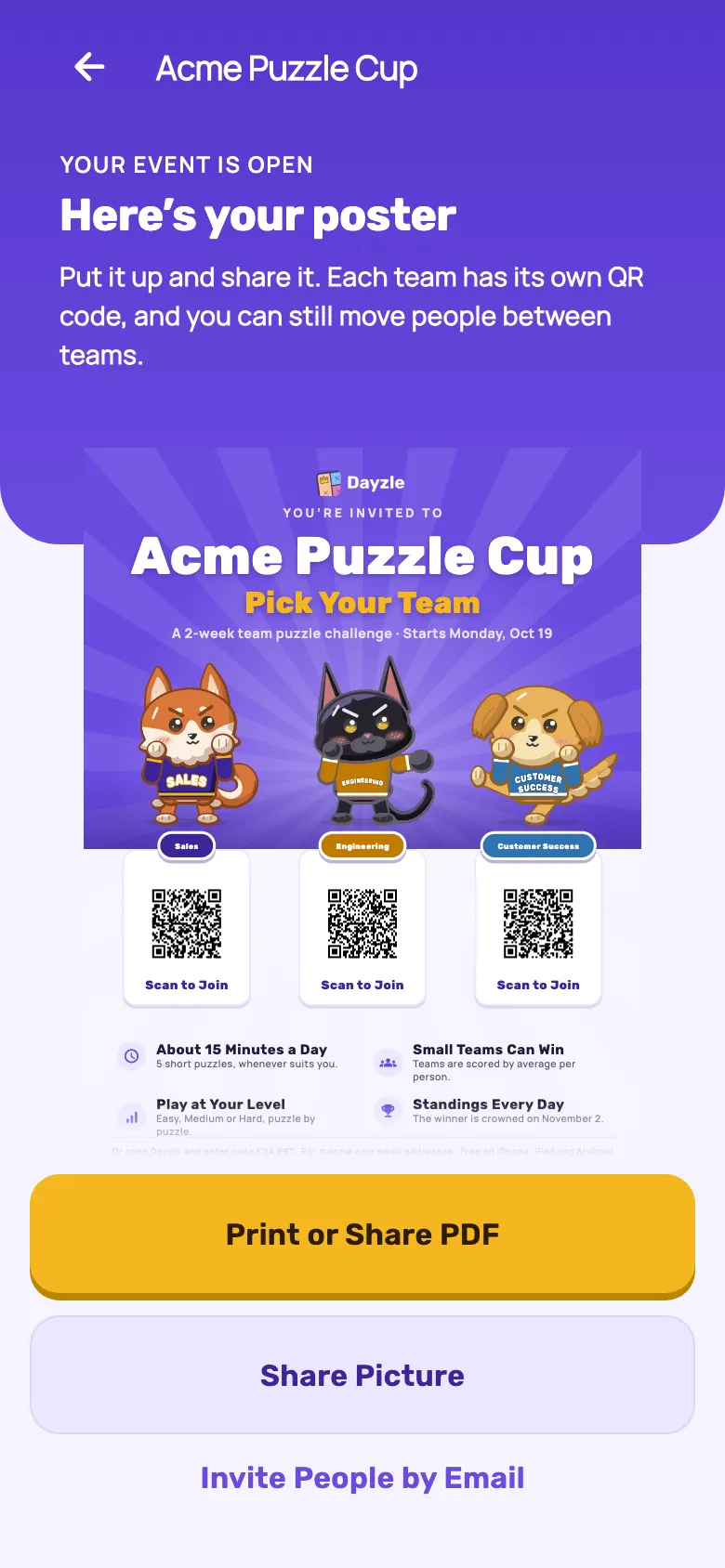
Create Event opens it straight away and hands you a poster: your event's name, each team's mascot, and a QR code for each team. Print it as a PDF or share it as a picture in Slack, Teams or a group chat.
- 3
People Pick a Team
Scanning a team's QR code joins that team. Limit it to your workplace's email domain and each person proves their address with a code we email them. You can still invite people by email or from your Dayzle friends, and move anyone between teams.
- 4
Everyone Plays the Day's Boards
Up to five short puzzles a day, on each person's own phone. They're the same boards for everyone in the event, from a stock kept for events, so nobody will have met them in the daily set or practice.
- 5
Teams Are Scored, Somebody Wins
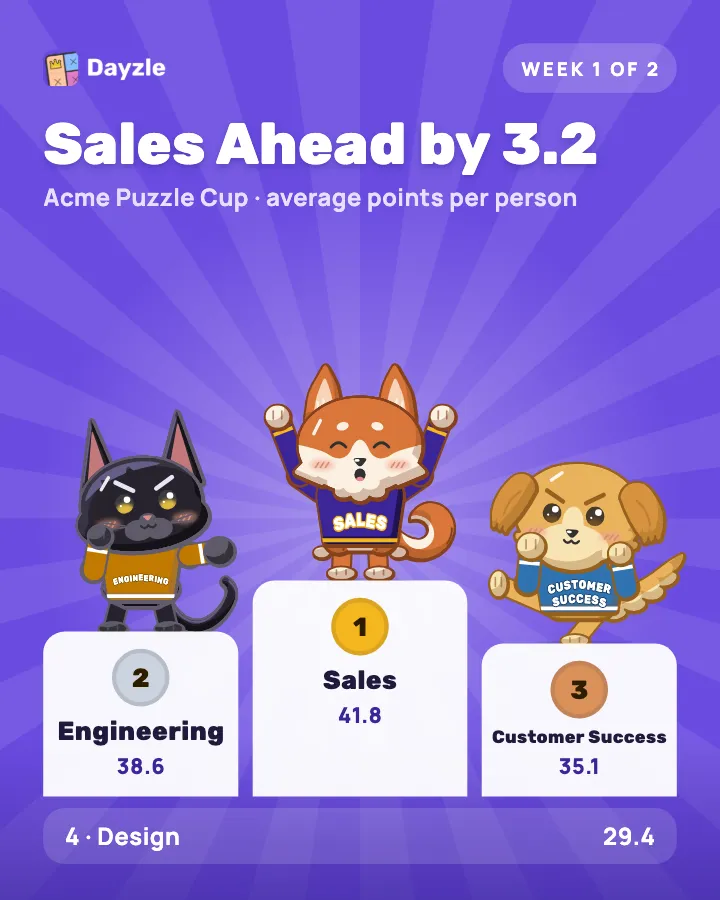
Standings by day, by week and over the whole event, for people and for teams. Medals each day and week. Pictures to share along the way — the line-up, the podium, and the champions at the end.
-
The Three Words
An event is the whole challenge. A team is a group inside it, scored together, with its own mascot. The style — Just for Fun, Friendly Rivalry or Bring Your A-Game — is how a finished puzzle turns into points.
You don't have to sell it. The poster does.
The moment your event opens, Dayzle makes its poster: the event's name, each team's mascot squaring up in its own jersey, and a QR code under each team. Scanning a team's code joins that team. Below them, the reasons to join, worked out from how you set the event up, so the poster never promises something your event doesn't do.
Print or Share PDF makes a US Letter page to print at actual size and pin up. Share Picture is the same poster for Slack, Teams or a group chat. The event page keeps a Poster row so you can come back to it.
Pictures for the rest of the event
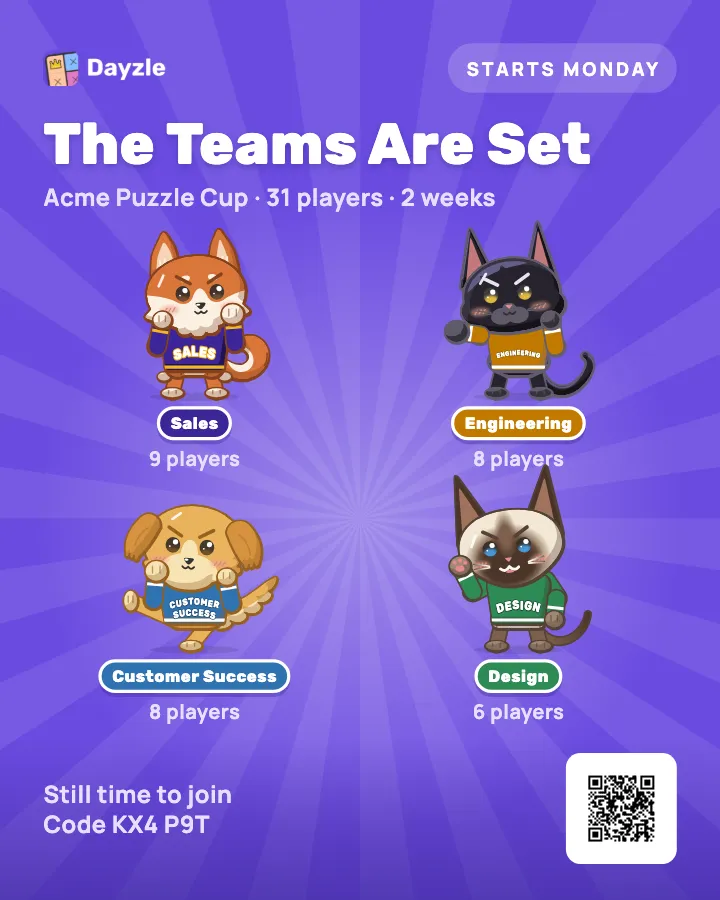
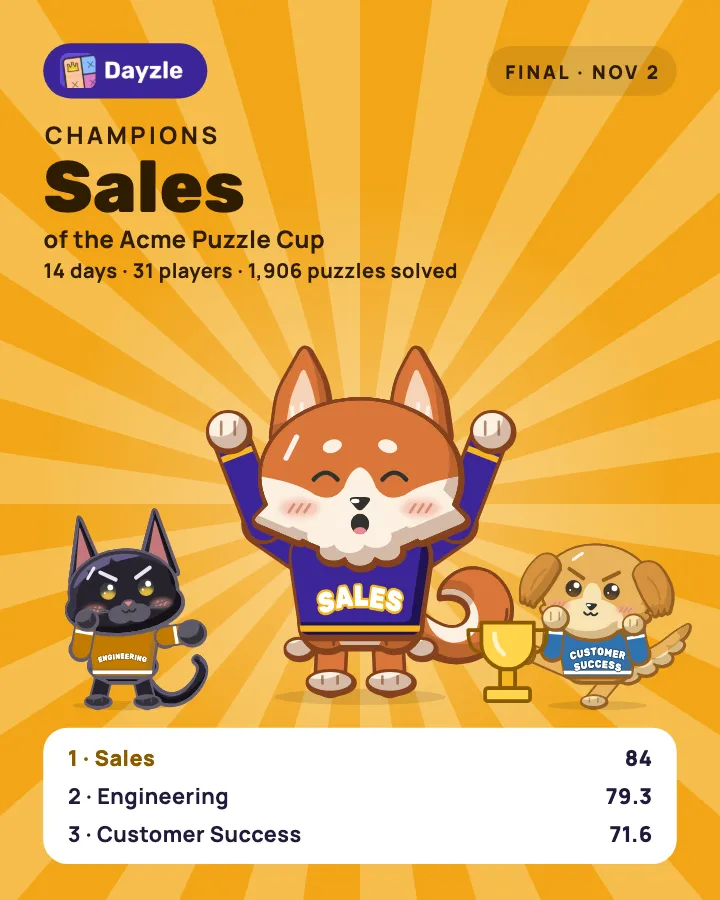
Anyone in the event can share these from the event page: the line-up before it starts, the standings on a podium while it runs, and the champions at the end. Teams are named; people only if the sharer turns that on.
Only if you set it up to be.
The thing that stops people joining a workplace challenge is the suspicion that it will quietly rank everybody. It doesn't have to, and the reasons are settings and scoring rules anyone can check. This is the section worth forwarding to the people you invite.
It's private to you and the people you invite
An event is invite-only and unlisted. There's no directory to browse and no search. The ways in are the Event Code — the QR codes on the poster — and an invite made for one person, which works once and can be taken back. Each person who joins with the code proves an email address, and the organizer can limit it to their company's domains (Start an Event recommends it) or replace it. Its name, its teams and its standings are readable by the people in it and nobody else, and that's enforced by the server rather than by hiding a button.
None of it leaves the event, either. The points, the medals and the winner stay inside it — nothing from an event appears on Dayzle's public leaderboards or in anyone's app-wide medals.
Finishing Is What Scores
On Just for Fun every puzzle you finish is a point. Friendly Rivalry, what most organizers pick, adds up to three more for few mistakes. Only Bring Your A-Game rewards speed or harder levels, and the organizer chooses it on purpose.
Nobody Can Outrun You
On Just for Fun and Friendly Rivalry a puzzle finished cleanly is worth the same whether it took four minutes or twenty. Whoever talked you into this can beat you only by making fewer mistakes — and only for their own team.
Pick Your Own Level
Each player picks the difficulty puzzle by puzzle, from the levels the event allows. On Just for Fun and Friendly Rivalry an Easy puzzle earns the same as a Hard one, so nobody has to play up.
Hints Don't Cost You Points
Stuck? A hint reads your actual board and explains its reasoning rather than handing you the answer. No style counts hints, so taking one never costs you a point.
Nothing Counts Down
Every board records how long it took, the way a step counter records a walk — a number afterwards, never a deadline. Even Bring Your A-Game's bonus for beating par is a bonus, not a clock you can fail.
No Ads on an Event Board
There's never an ad in front of a board you're playing for an event, or after it.
Teams Compete, Not People
The headline is team against team, and a team is scored on its average per person, so a team of two can beat a team of six. The harshest thing the standings ever say about a day is Didn't play.
Your Times Are Private
Show My Times is off until a player turns it on. Everyone in the event sees points; nobody sees how long anyone took unless they chose to show it.
Practice Can Count Too
On Friendly Rivalry and Bring Your A-Game, a practice board you win, in any game, scores in the event too — five or twenty a day. A day you can't face the whole set is still a day you can help your team.
What an event actually measures is whether a group of people showed up and gave something their attention for a few minutes a day. That is the part a team can do together, and it is the part worth a trophy at the end of the month.
Setting one up, step by step.
Before you start
- Dayzle on your phone, up to date. If your Events tab asks you to update, that's why. Start an Event's five questions, the team mascots and the poster need the latest version.
- A Dayzle account. Playing Dayzle needs no account; running or joining an event does, so the points stay with the right person.
- Two or more people, on two or more teams. That's the least an event will start with.
- A wall, a channel or a group chat for the poster. Email addresses and Dayzle friends work too — you can mix them in one event.
- Five to fifteen minutes a day from each person, depending on the style, for one, two or four weeks.
How competitive?
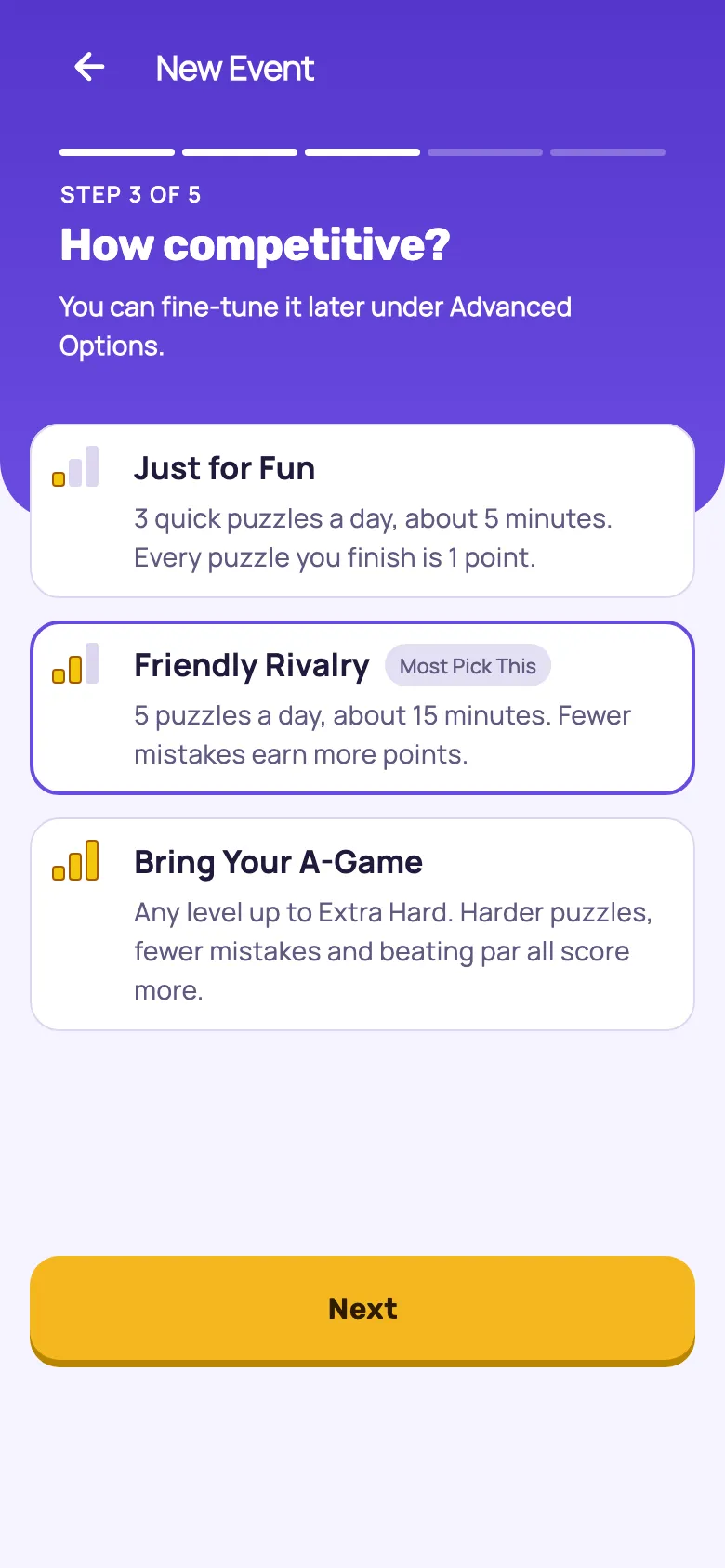
Start an Event offers three styles. Example: a Medium puzzle with one mistake, finished under par.
- Just for Fun 1 point
- About 5 minutes a day
- 3 quick puzzles a day at Easy or Medium. Every puzzle you finish is 1 point, and practice doesn't count, so showing up is the whole game.
- Friendly Rivalry 3 points
- About 15 minutes a day
- 5 puzzles a day at Easy, Medium or Hard. A point for each, plus up to 3 more for few mistakes. Five practice puzzles a day count too. What most organizers pick.
- Bring Your A-Game 10 points
- 15 to 40 minutes a day
- 5 puzzles a day at any level up to Extra Hard. Few mistakes and beating par both score, and a harder puzzle is worth more — up to four times an Easy one.
1. Answer five questions
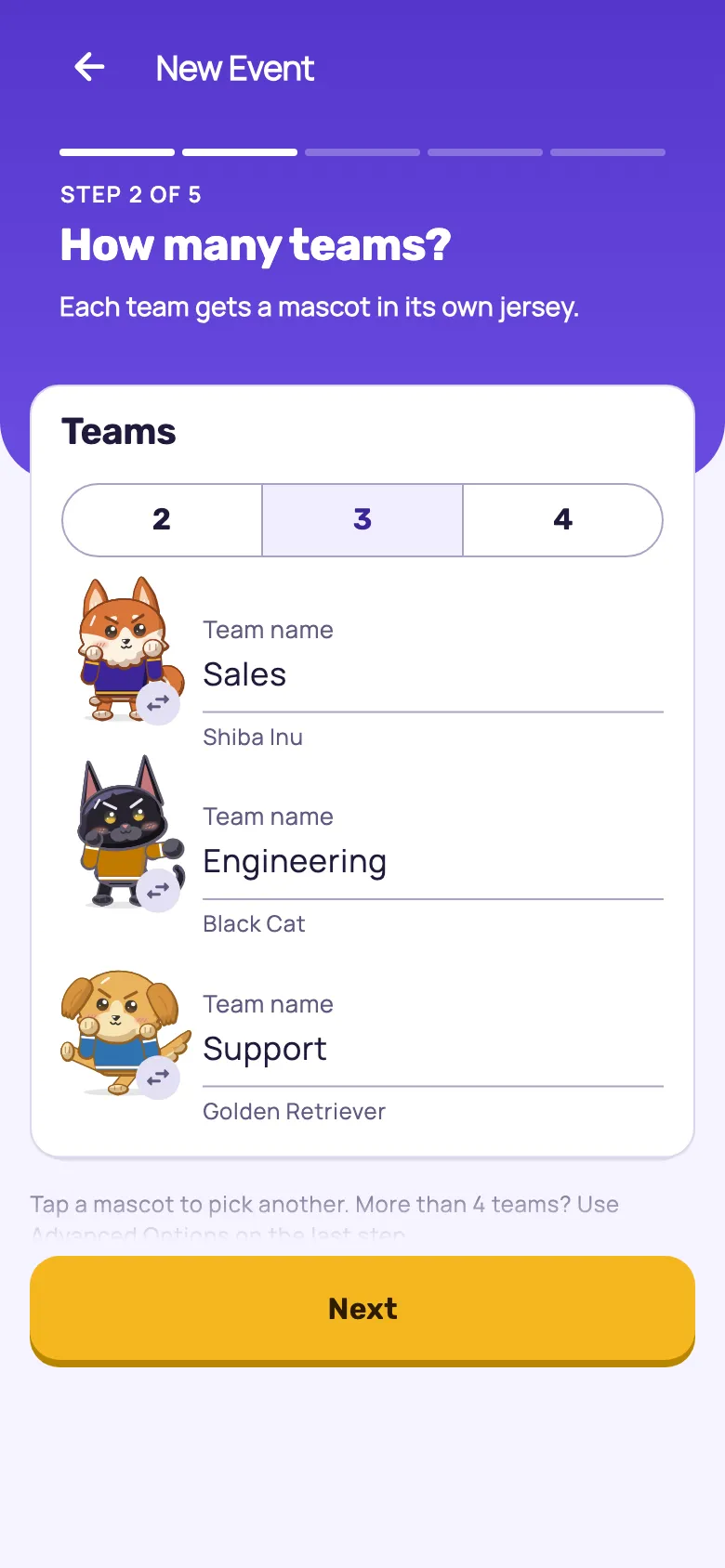
Open Dayzle, tap Events on the bottom bar, and under Your Events tap Start an Event. It asks, one screen at a time: What's your event called?, How many teams? (2, 3 or 4, each with a dog or cat mascot you can swap, and a name you type), How competitive? (the three styles), Who can join? and When does it start? (tomorrow, the coming Monday or a date you pick, for 1, 2 or 4 weeks). On a tablet or a computer the poster fills in beside the questions as you answer them.
You're in the event too — you take one of the 50 seats, you're on a team, and you play the day's boards like everybody else. You can run one event at a time.
2. Say who can join
Only My Workplace is the recommended answer, with your own email domain filled in if you sign in with a work address: each person proves an address ending in it with a six-digit code, so a stranger who sees the poster can't join. Anyone With the Code is for family and friends.
The event runs on your clock: day 1 is the start date in your timezone, and each day's set turns over at your midnight, not each player's. If your team is spread across time zones, that's worth saying once up front — somebody in Sydney gets a new set in the middle of their afternoon.
3. Create it, and put up the poster
Create Event opens the event with its code on and shows Here's your poster. Print it, or share it as a picture wherever your group talks. Nothing is emailed to anyone unless you invite them yourself.
4. Invite people directly, if you like
Invite People takes a pasted list of email addresses — commas, spaces or new lines, up to 49 at a time — and a tick list of your Dayzle friends. Every invite is its own single-use link, with Copy Link beside it, and Revoke to take one back and free the seat. An address is only how an invite is delivered: the code inside it works on whichever Dayzle account the person is signed in to.
5. Or change anything first
On the last question, Advanced Options saves the event as a draft and opens Event Setup with your answers in it: more than four teams, a different challenge, the start time, the difficulties, the games, how many boards a day and how much practice counts. A draft sends nothing until you tap Open Event and Send Invites.
6. Fix anything, right up to the start
Every setting stays editable until the event starts. On Adjust Teams you can drag someone onto another team, tap them and pick one, or tap Auto-Balance Teams to even them out. Before the start, Share the Teams shares the line-up as a picture. It starts on its own at the time you chose, as long as two or more people are in and two or more teams have somebody on them; otherwise it waits and tells you what's missing. Or tap Start Now.
And if it turns out to be the wrong fortnight entirely, you can back out: a draft is deleted outright, and an event you've already opened is cancelled — its invites stop working and it moves to Past Events. Neither asks anyone's permission.
7. While it runs
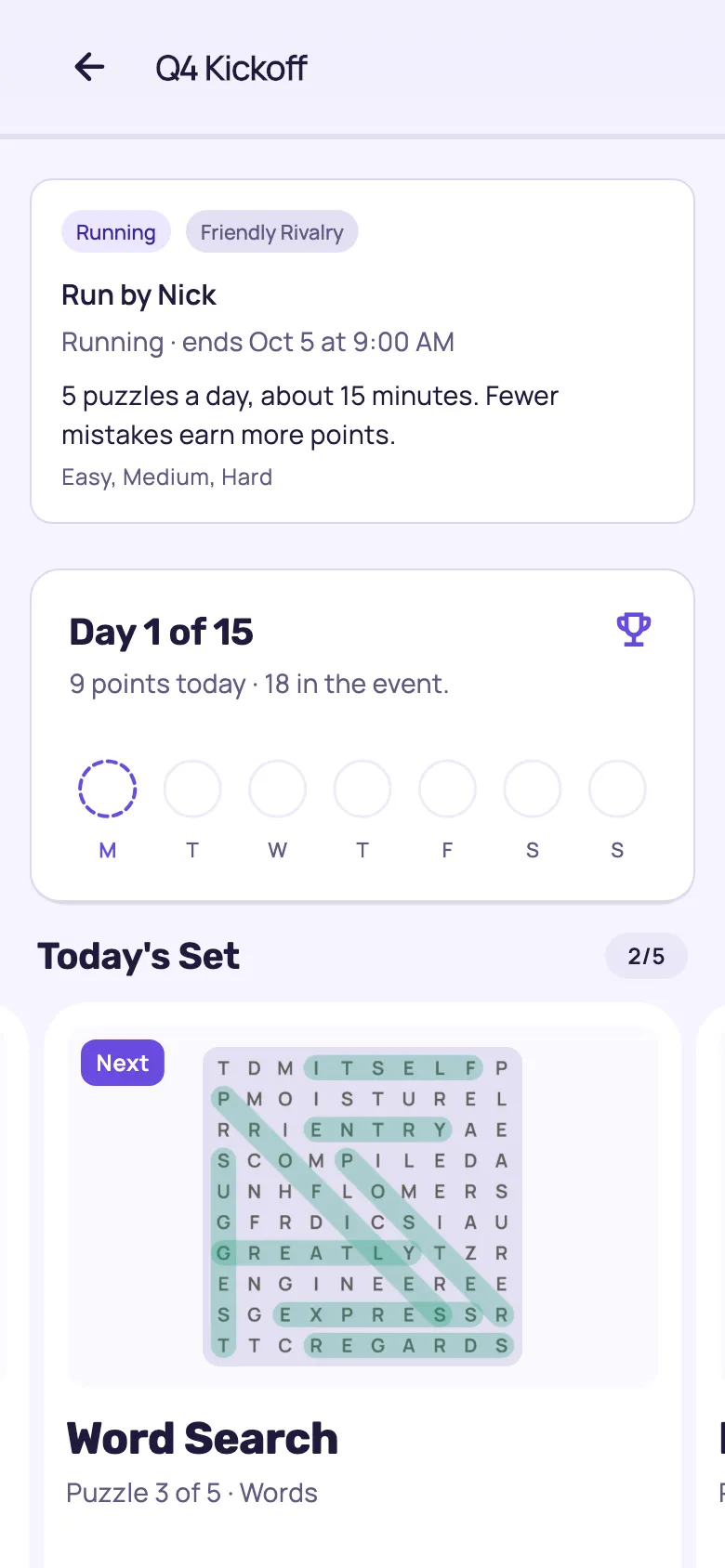
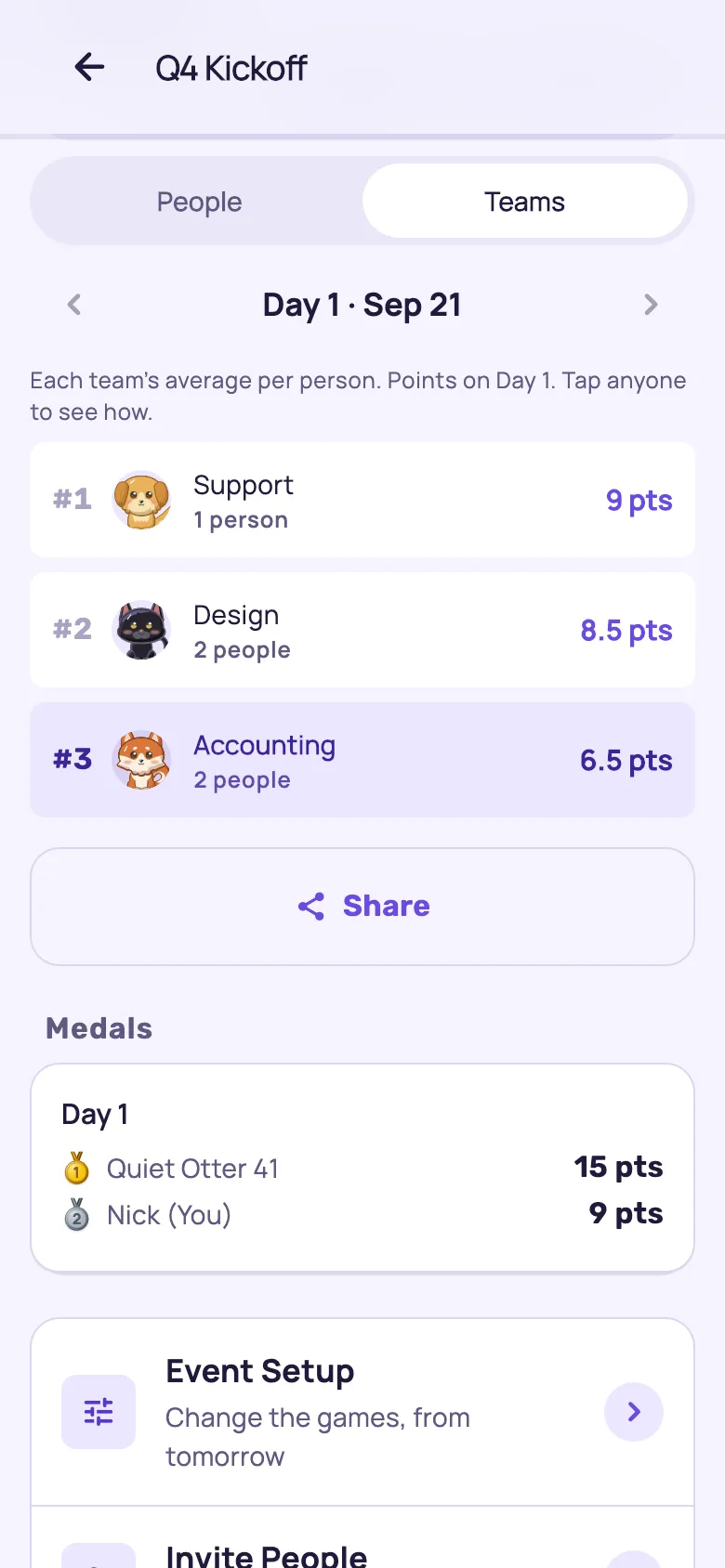
The event page leads with the day, the points so far, and today's set. Standings switch between Day, Week and the whole event, and between People and Teams; tap anyone to see their points day by day. Medals go to the top three each day and each week. You can still move or remove people — their points go with them — and Stop Event ends it early.
8. When it ends
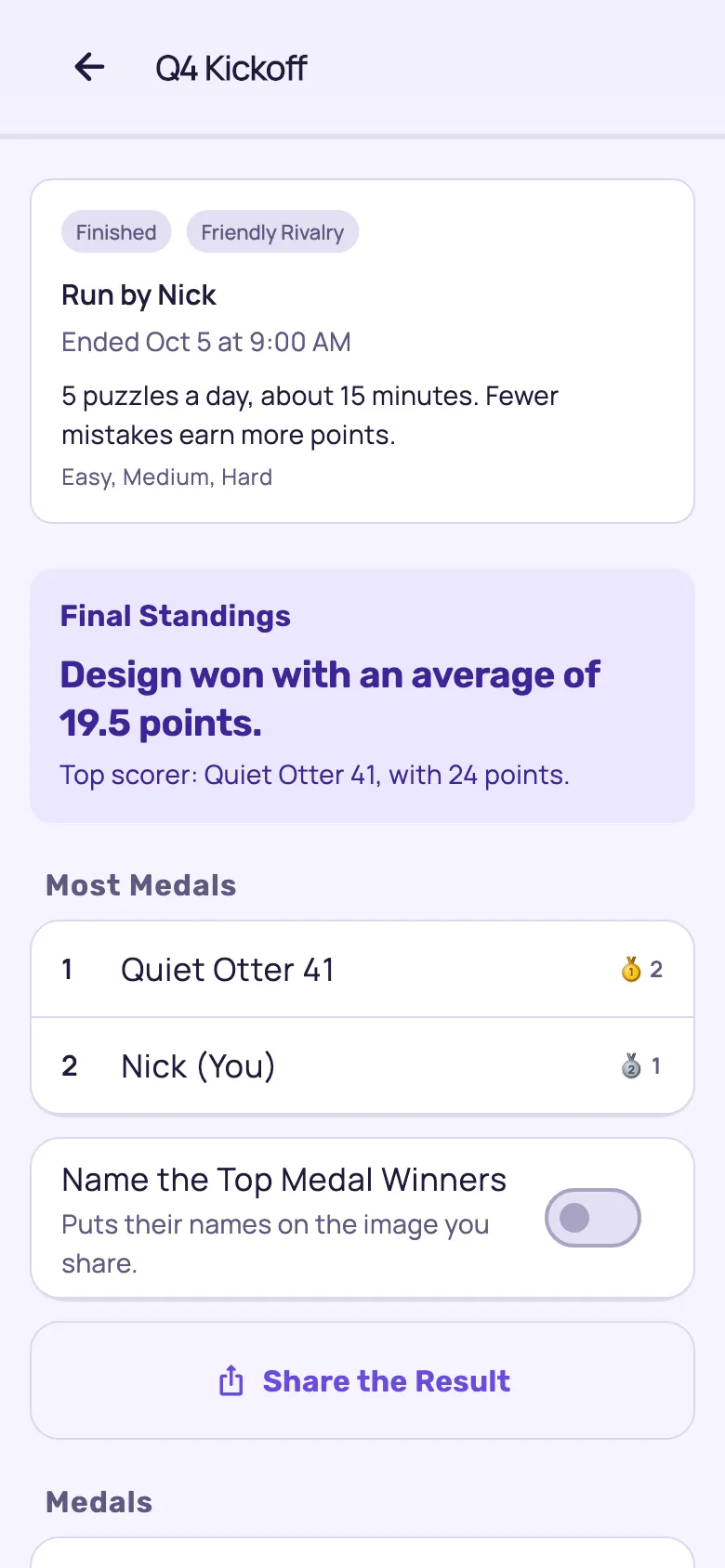
Final Standings names the winning team in a sentence, Most Medals lists who won the most, and Share the Result offers Copy for Slack or Share Image for the group chat — the champions with their cup and the top teams, with no individual names unless you turn on Name the Top Medal Winners. Anyone who took part can then tap Duplicate This Event to set up the next one.
What's already decided for you
An event from Start an Event is playable without touching any of this. These are what it sets under Advanced Options, and the reason you might move one.
Team Scoring
A new event uses Average per person
Change it when Never, if your teams are different sizes — that's what Average is for. Total adds the points up instead, which gives the biggest team the advantage of its size
Placing People
A new event uses Players pick their team
Change it when You'd rather put everyone in the smallest team, place them yourself, or set a team on each invite. The poster then has one QR code instead of one per team
Difficulty, Boards Each Day, Practice
A new event uses Set by the style you picked
Change it when You want something in between — Boards Each Day goes from 1 to 5, and practice from none to no limit
Challenge
A new event uses Set by the style you picked
Change it when You want Hearts, Streak, Speed, or your own Custom mix of points instead
Games
A new event uses Every game except Quiver and Quiver Hive
Change it when Your group wants words only, or numbers only, or Sudoku only
Members See Each Other's Email
A new event uses On
Change it when Nobody in the group should see the addresses — each person also chooses their own
One thing to know if you pick the Hearts challenge under Advanced Options: the five games that have no hearts — Cipher, Lattice, Parcel, Tumbler and Word Search — are greyed out and named when you choose games, because every board of theirs would score the same.
The limits, in one place
People
50
counting you, and every invite nobody has answered yet
Teams
2 to 4, or up to 10
2 to 4 in Start an Event, up to 10 under Advanced Options. Named by you, or after their mascot, and renameable until the event ends
Length
1, 2 or 4 weeks
from the date and time you choose, in your timezone
Boards a day
Up to 5
the same boards for everyone, from a stock kept for events
At once
1 event
open or running, plus up to 3 drafts you haven't opened yet
Cost
Free
an Early Player Bonus while custom events are new
Somebody added you to a puzzle challenge.
It's a step challenge for your brain. Do a puzzle, get a point, repeat — and like a step challenge, nobody is judged on pace, and the points are for your team rather than for you. Dayzle is a daily puzzle app — Sudoku, word games and visual logic, across more than 25 games. Here's what you're being asked for, what it costs, and what the other people in it can and can't see.
You don't need a work account
Whichever Dayzle account you're signed in to when you join is the one that joins. Use a personal email, or Sign in with Apple or Google, or the Dayzle account you already play on. If the event is limited to your workplace, you prove a work address with a six-digit code we email it — but the account can still be your personal one, and you never have to sign up with your work email. An invite emailed to you works the same way: its code holds your seat, not the address it arrived at.
Using a personal account doesn't hand that address over either. The organizer sees the address they invited beside your name, so they know which colleague you are — never the email you actually sign in with.
What it asks of you
Up to five short puzzles a day — Sudoku, word games, visual logic — on your own phone, whenever suits you. Five to fifteen minutes, depending on how the organizer set it up. Miss a day and you've missed a day: nothing is deducted and nobody is told. The one catch is that you can't go back for it — each day's set is replaced by the next one at the organizer's midnight, so there's no catching up at the weekend.
What it costs
Nothing. Dayzle is free to play and joining an event is free. There's no trial, and nothing to buy to take part.
What you need
Dayzle on your phone, and a Dayzle account. Ordinary play needs no account at all, but an event does — it's how your points stay yours across devices.
How to accept
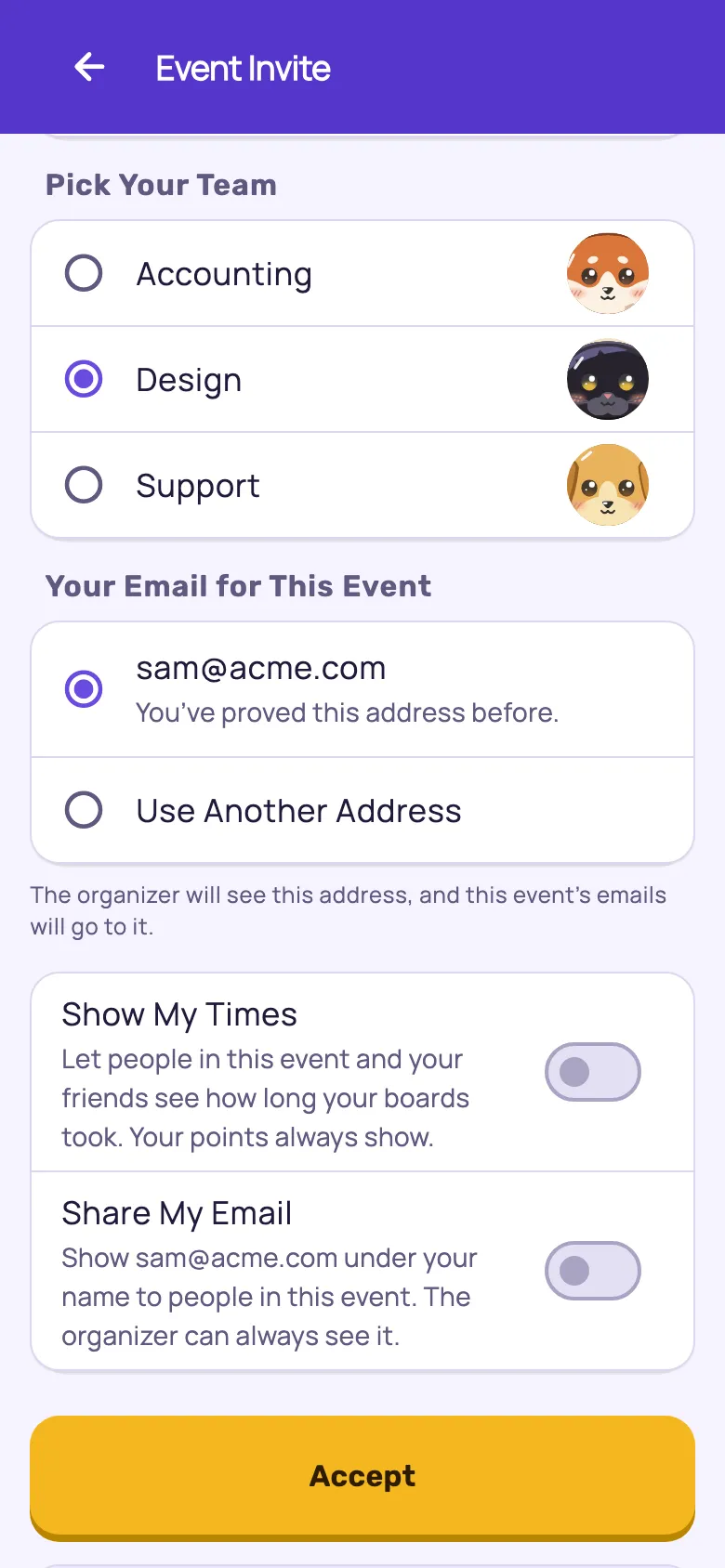
Point your phone's camera at your team's QR code on the poster, or in the app go to Events, tap Enter Invite Code and type the code. Pick Your Team starts on the team whose code you scanned. Dayzle asks for Your Email for This Event and, for an address you haven't proved before, emails a six-digit code to check it's yours. Then tap Accept. If you were emailed your own invite, tap Open the Invite instead. Nothing happens until you tap Accept — scanning or opening a link takes no seat.
What other people can see
Your Dayzle name and your points. Not your solve times, unless you turn on Show My Times. Not your email address, unless the organizer allows it and you turn on Share My Email. Not your real name, unless you chose it as your Dayzle name. Nothing from an event reaches Dayzle's public leaderboards — and nobody outside the event sees any of it, because only the people in it can read the event at all.
If you'd rather not
Not Now leaves the invite where it is and asks again next time. Decline, offered when the invite is waiting in your Events tab, ends it, gives your seat back to the organizer, and lets them know — so they aren't waiting on an answer that never comes. Joining later would need a fresh invite.
On a day you're busy
In most events, any practice board you win, in any game, scores in the event too — up to five a day on Friendly Rivalry, twenty on Bring Your A-Game. So a day where you'd rather play one Sudoku than the whole set still counts for your team.
Leaving, and changing your mind
Leave Event keeps your points and frees your seat, and Rejoin Event puts you back on the same team with the same points, any time while the event is still running and a seat is free.
One thing that surprises people: your ordinary Dayzle streak still comes from the daily puzzles — one played daily game, from the five-game set or Today's Sudoku — not from the event. Event boards count as practice — they feed your stats and your Brain Score, and they earn points for your team.
Four emails, plus a code if you ask for one.
Worth reading before you paste a list of your colleagues' work addresses into anything. Every one comes from Dayzle Events, and every one carries an unsubscribe link that stops Dayzle event email to that address and nothing else.
When you open the event, or invite someone after
“[Your name] invited you to [Event] on Dayzle”
Sent to each address you invite by email. How the challenge is scored, when it starts, a button that opens the invite, and the code itself for someone who installs the app first. Opening the link spends nothing — a seat is taken only by Accept in the app, which matters because company mail scanners open every link before the person does.
The day before it starts
“[Event] starts tomorrow”
When it starts, how it's scored, how many weeks it runs, and which team the reader is on. Sent from 8:00 AM in your timezone, so it never lands at midnight.
At the end of each event week
“[Event]: week 1 standings”
The top three teams for that week, and the reader's own week — their points and where their team came. The final week has none, because the final standings follow within a day.
When the event ends
“[Event]: final standings”
Who won, in one sentence, the top three teams, and the reader's own event.
Anyone can turn the last three off for themselves in Dayzle: tap your avatar at the top right, then Settings, then Notifications, then Event Emails. An address that never joins an event hears from us once, and not again. The one other email is a six-digit code, sent only when somebody taps Send Code to prove the address they use with the Event Code.
Questions organizers ask.
What does it cost?
Nothing. Dayzle is free to play, joining an event is free, and creating one is free right now as an Early Player Bonus while custom events are new. There are no seats to buy and nothing for the people you invite to pay.
Does everyone need to install the app?
To play the boards, yes — on an iPhone, iPad or Android phone. Setting an event up, inviting people and reading the standings all work in a browser at play.dayzlegame.com, so you can run the organizing half from your desk while everyone plays on their phones. Printing the poster as a PDF needs the app on a phone or tablet.
Who else can see the event?
Only the people in it. An event is invite-only and unlisted — there's no directory to browse and no search. The ways in are the Event Code — the QR codes on the poster — and an invite made for one person, which works once. Each person who joins with the code proves an email address, and Only My Workplace (Only These Email Domains, under Advanced Options) limits it to your company's addresses. Its name, teams and standings are readable by members alone, enforced on the server rather than by hiding a button, and nothing from it reaches Dayzle's public leaderboards or anyone's app-wide medals. The one thing to handle carefully is a copied invite link: it's the key to its own seat, so whoever opens it takes that place. Hand links to people directly rather than posting one in an open channel, and revoke any that goes astray.
Do people have to sign up with their work email?
No, and it's worth telling them so — it's the thing that stops people joining. With Only My Workplace on, they prove a work address with a six-digit code, but the Dayzle account that joins can be a personal one. And with an emailed invite, the address is only how the invite is delivered. Each invite carries its own single-use code, and whichever Dayzle account the person is signed in to when they open it takes that seat, so a work invite can be accepted on a personal account and anyone who already plays Dayzle keeps the account they have. You can still tell who is who: everyone you invited by email is listed under their Dayzle name with the address their invite went to, and you see that whether or not you let members see each other's addresses.
Can people join after it has started?
Yes. The poster's QR codes and the code keep working while the event runs, and you can invite people by email any time; they pick their team, unless you changed Placing People. They will have missed the earlier days' boards, which can't be gone back to.
What if half the team forgets to play?
Then their team scores less — average scoring doesn't soften that, because somebody who stays in the event and doesn't play is a zero in their team's average just as surely as they're a gap in its total, and there's no catching up at the weekend because each day's set is replaced at midnight. What actually helps: make the daily ask smaller — Just for Fun is three puzzles a day — and lean on practice counting, so anyone who plays anything at all contributes. Dayzle nudges on its own with a dot on the Events tab until the day's boards are done and a standings email at the end of each week. And if somebody is genuinely out for the month, Leave Event takes them out of their team's average rather than leaving a zero in it.
Can somebody catch up on a day they missed?
No — and it's the one thing worth saying when you send the invite round, because people plan to catch up at the weekend. Each day's set is replaced by the next one at the organizer's midnight, and yesterday's boards can't be reopened. A missed day simply scores nothing; there's no deduction and nobody is told. If your group is likely to be busy, pick Just for Fun, three puzzles a day rather than five — a day somebody actually finishes is worth more than a day they abandon.
Can my manager see how I did?
Everyone in the event can read the standings, which show each person's Dayzle name and their points. Solve times are hidden unless that person turns on Show My Times. Your real name never appears unless you chose it as your Dayzle name, and nothing from an event reaches Dayzle's public leaderboards.
Can someone be in more than one event?
Yes. You can run one event at a time, but there's no limit on how many other people's events you're in — and a practice board you win scores in all of them.
What if somebody drops out?
Leaving keeps their points and frees their seat, and they can rejoin any time while the event is still running and a seat is free. As the organizer you can also move people between teams or remove them; points go with the player.
Do event puzzles count toward my streak?
Your daily streak still comes from the daily puzzles: one played daily game, from the five-game set or Today's Sudoku, keeps the day. Event boards count as practice: they feed your stats and your Brain Score, and they earn points in the event.
Can I run the same event again next quarter?
Yes. Duplicate This Event copies the settings, the teams and their mascots, and the invite list into a fresh draft with new links; you set a new start date and open it. Anyone who took part can duplicate it, not just the organizer.
How do I stop the emails?
In Dayzle: your avatar at the top right, then Settings, then Notifications, then Event Emails under By Email. Every event email also carries an unsubscribe link, which stops Dayzle event email to that address and nothing else — an invite link still works afterwards.
Your first event is five questions and a poster.
Get Dayzle free, sign in, and tap Events. You can build the whole thing in a browser if you'd rather do it at your desk — the day's boards are played on a phone.